


Enhanced admin controls and unlimited configurability allow you to run your cycles confidently and securely – without a single spreadsheet.
Compensation is more than just salary. Educate employees about their total compensation, including the value of benefits and equity.


Store your pay ranges in one place, then share selectively based on permissions. Eliminate the need to make updates across multiple places.
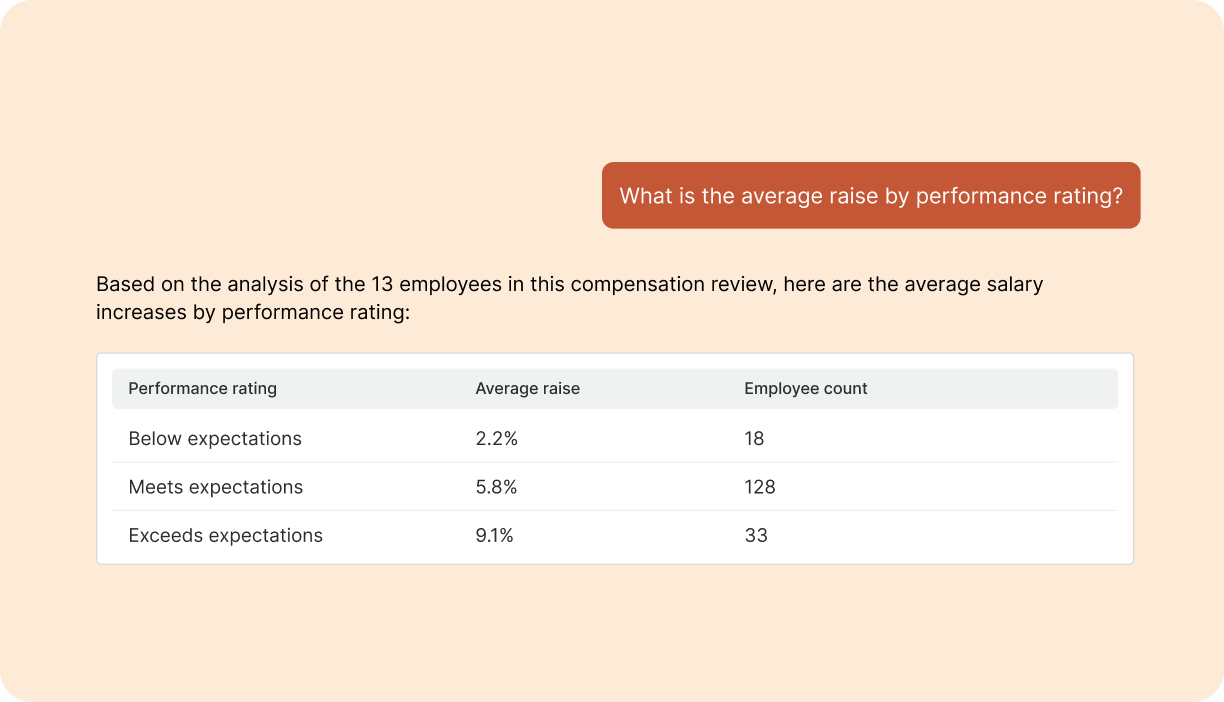
Ask any question to surface immediate insights from your comp data, and equip managers with personalized coaching for every employee conversation. Less prep, better outcomes.


Compensation management software helps HR and Finance teams automate and manage all aspects of employee compensation — from salary and equity reviews to bonus cycles and total rewards communication. It replaces complex, error-prone spreadsheet workflows with a centralized system that integrates with your HR tools and empowers managers with visibility and control.
It’s designed to streamline budgeting, approvals, and communication across departments, while improving employee engagement and ensuring pay equity.
Read more about how to choose the best compensation management software.
Comprehensive streamlines compensation review cycles by replacing manual spreadsheets with a centralized, automated platform that brings HR, Finance, and managers into alignment. It helps teams set clear compensation philosophies, allocate budgets efficiently, and manage promotions, merit increases, and pay equity adjustments with confidence.
The result? A faster, less error-prone, and more transparent process that reduces administrative overhead and ensures employees feel valued and fairly compensated.
Learn more about planning your compensation review cycle.
Explore the benefits of a structured compensation review process.
A single cycle can include promotions, base salary changes, bonus targets, bonus payouts, and equity grants—all configured within one workflow. Companies can also run separate bonus-only cycles for different employee groups or cadences, and variable compensation or OTE structures are fully supported.
Highly flexible. Administrators can configure merit logic using performance ratings, compa-ratio positioning, tenure-based eligibility, and custom formulas. Caps, floors, and range-based guardrails can be applied with optional justification requirements. Fields can be fully editable, formula-driven, or a combination of both—and managers can view customized columns and layouts tailored to their role. Formal pay ranges are optional; cycles can run without them and ranges can be added later. Rules, formulas, and configurations can also be adjusted mid-cycle—employees don't see changes until award letters are released. Contractors and other non-eligible worker types can be permanently excluded using filters and eligibility rules.
Approval chains are configurable by role, hierarchy, or org structure, and can be added, removed, or reassigned during an active cycle. Companies typically designate direct managers as proposers and senior leaders or HR as approvers, though cycles can also restrict recommendations to admins only. Approvers can review and edit individual employee recommendations within batch workflows, and justification requirements can be enforced for specific actions like exceeding guidelines or off-cycle promotions. Workflows can also vary by country or geography using HRIS attributes. Notifications can be enabled to prompt managers and approvers when actions are needed, reducing delays and manual follow-ups.
Common approaches include fixed percentage pools, dynamic budgets calculated from suggested increases, or combined merit-and-promotion budgets. Eligibility rules can calculate budgets dynamically by department, country, or other attributes. Managers see their total available budget and real-time usage as they make recommendations.
Pay ranges can be imported, maintained, and updated within the platform. Ranges can be mapped to job titles or groups of titles, making it easy to find the appropriate range when reviewing compensation or posting roles. Comprehensive can model compa-ratio philosophies and display employee positioning within ranges. Benchmark targets can be adjusted and aligned with internal leveling or grading frameworks, and leveling fields can be pulled from the HRIS or added as custom fields for use in cycles, reporting, and analytics.
Learn how to create salary ranges.
Field-level permissions let administrators control exactly what managers, employees, and other roles can see. For example, bonus targets can be hidden while still showing calculated payouts, and equity data can be restricted to HR, Finance, or executive leadership. Employees typically access only their Total Rewards dashboard and award letters—not in-cycle planning views. Access is managed through SSO and HRIS-based permissions, and visibility can be scoped by department or reporting line so leaders only see their own teams. Limited access can also be configured for specific functions like recruiting, providing offer guidance without full compensation visibility.
Total Rewards dashboards display base salary, bonuses, variable compensation, equity, benefits, and other employer-provided rewards based on available data. Benefits and rewards like PTO or holidays can be included via HRIS integrations or manual uploads—when benefits data isn't available through an API, employer-paid costs can be uploaded manually with explanatory notes. Compensation is displayed in local currency with optional exchange rate conversion. Dashboards can be customized by employee group or geography, and employees access them through SSO alongside their award letter history. Dashboards are commonly launched at the end of a compensation cycle but can be rolled out at any time.
Comprehensive supports configurable templates for compensation and award letters delivered digitally as web-based documents with optional PDF downloads. Templates can reference calculated values like percent increases, and visibility for specific fields can be toggled on or off. Additional guidance or explanatory content can be included to help employees understand compensation decisions. Award letters can also be generated from uploaded data without running a full cycle, providing a structured alternative to manual mail merges. Administrators can track letter delivery, see which have been acknowledged, and send reminders in bulk.
Comprehensive supports pay equity reporting, demographic segmentation (by gender, race, age, and other attributes), promotion rate analysis, and market-position distribution views. Compensation can be normalized for part-time or FTE-based comparison, and views can include custom HRIS fields. Comprehensive also supports analytics needed for EU pay transparency requirements, with reporting capabilities that continue to expand.
Yes — Comprehensive integrates seamlessly with industry-leading HRIS, performance management, equity, and benchmarking tools. You can automatically sync employee data, performance ratings, and equity information to eliminate manual entry, reduce errors, and ensure compensation decisions are based on the most up-to-date insights.
Popular integrations include BambooHR, Rippling, Culture Amp, 15Five, Carta, Mercer, and more. These connections help you centralize your workflows and deliver a complete view of employee compensation—all in one platform.
